


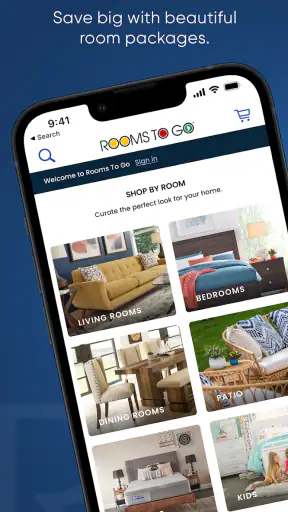
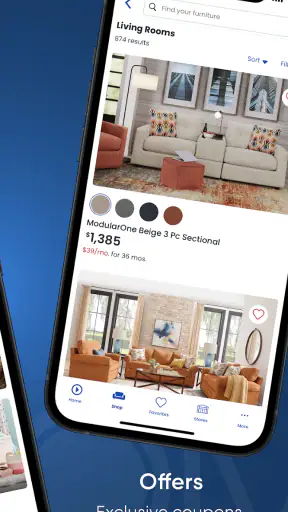
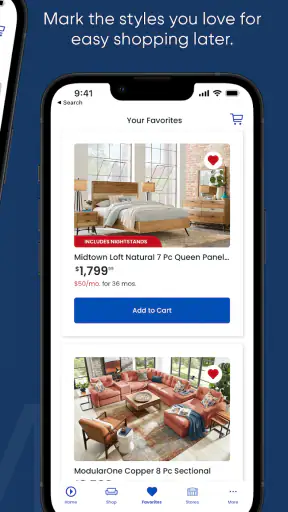

Shopping for furniture on a phone can either save me a trip or turn into a frustrating exercise in loading screens and tiny product images. Rooms To Go sits firmly in the first group when my connection is reliable. It is a free shopping app from Roomstogo.Com, Inc., focused on browsing furniture and room collections from a mobile screen. I found its main appeal in the way it brings a large-room shopping task into smaller, more manageable decisions: look around, compare pieces, revisit ideas, and decide whether a particular room direction is worth pursuing.
The app is aimed at Everyone, and it has been available since October 2, 2014. Its current version is 9.7.1, with a minimum operating-system requirement of 10. That makes the compatibility question important before installing, especially if you use an older phone or tablet. On supported devices, the experience feels most useful when I treat it as a visual planning and shopping companion rather than a complete replacement for seeing furniture in person.
How Rooms To Go feels when the connection is doing the work
Browsing depends heavily on a steady network
The first thing I noticed is that a furniture catalog is naturally demanding for a mobile connection. Product photography, room scenes, item details, and shopping pages all need to arrive before the experience becomes useful. When the network is strong, moving through the app feels straightforward: I can browse a collection, stop on a piece that catches my eye, and continue comparing without having to change the way I shop.
That same visual strength becomes a weakness on an unreliable connection. Furniture decisions depend on seeing scale, color, texture, and how several pieces look together. If images load slowly or a page pauses while I am trying to compare options, the app loses much of its advantage. I would not judge a sofa, bedroom set, or dining group from a partially loaded page, so a weak signal can turn casual browsing into repeated waiting.
For that reason, I get more from Rooms To Go when I use it at home, on dependable Wi-Fi, or somewhere with a strong mobile signal. A quick browse in a parking lot or while moving between appointments is still possible, but it is less comfortable when every image matters. The app is not just displaying text and prices; it is asking the connection to deliver a visual showroom to a small screen.
Why room-based browsing is useful on a phone
What works well for me is starting with a room idea instead of searching immediately for one isolated object. Furniture is difficult to judge piece by piece because a chair that looks appealing alone may not suit the sofa, bed, table, or storage already in a room. Rooms To Go is more helpful when I use its catalog to form a complete direction first, then narrow down the individual items that fit that direction.
This approach also reduces one common mobile-shopping mistake: opening dozens of unrelated products and losing track of why I saved or considered them. I can begin with the room I am actually trying to furnish, pay attention to the overall look, and only then examine details. That is a more realistic workflow for a living room or bedroom than treating the app like a general marketplace full of disconnected listings.
My practical tip is to decide what problem I am solving before opening the app. Am I furnishing an empty room, replacing one worn item, or trying to make an existing set feel less mismatched? The answer changes how useful the catalog becomes. For a full-room project, the visual collections can help me think in combinations. For one replacement piece, a focused search and careful measurement matter more than browsing attractive room scenes.
Using it in real mobile situations
A realistic use case is a weekend move. I might be standing in a new apartment with rough measurements in my notes, checking whether a room needs a sofa, a bed, or a complete set. In that situation, the app helps me turn an empty space into a shortlist before I spend time visiting a showroom. I can browse from the room itself, compare the general style with the walls and flooring, and avoid making a decision based only on a memory of what the room looked like.
Another useful moment is shopping with someone who is not beside me. I can show a room concept to a partner or family member, discuss whether the style fits, and remove options that clearly do not work before making a more serious decision. This is where a phone is more convenient than a printed catalog, because the discussion can happen wherever I am. The limitation is that the other person still sees the same screen-sized images, not the physical furniture, so disagreements about comfort, color, or scale may remain.
I would also use the app while visiting a home improvement store or looking at paint samples. A room collection can give me a style reference, but I would not assume that a screen image perfectly matches the actual finish. Lighting, display settings, and the surrounding room can all change how a color appears. The app is good for narrowing choices; it is less dependable as the only judge of material feel or exact shade.
What happens when pages fail to load
Connectivity problems are more noticeable here than in a text-focused shopping app because the catalog depends on images. If a page stalls, my first response is to stop tapping repeatedly. Refreshing several times can make it harder to tell whether the issue is the network, the page, or the phone. I prefer returning to the previous screen, waiting briefly, and trying again only once the connection is stable.
If I am comparing furniture in a place with poor reception, I switch from making a purchase decision to collecting a short list of ideas. That distinction matters. I can remember the style or note the product name, but I would postpone any final review until I am back on a reliable network. This prevents a rushed choice based on incomplete images or a page that has not fully presented the relevant information.
The app is also less convenient when my browsing session is interrupted. A phone call, a dead battery, or a move from Wi-Fi to mobile data can break the rhythm of comparing several rooms. I therefore try to do serious furniture research in one deliberate session rather than assuming I can casually pick it up in tiny fragments throughout the day. That is not a deal breaker, but it changes how I plan to use it.
Recovering without losing the shopping thread
My best recovery method is to keep the project small. Instead of trying to remember every attractive item, I reduce the search to a few realistic candidates and write down the details that affect the decision: the room it belongs to, the approximate dimensions I need to check, and what existing furniture it must work with. If the connection fails, I have a useful shortlist rather than a vague memory of several images.
This is especially helpful for users who shop on a phone with limited time. A catalog can encourage endless scrolling, but a short list creates a stopping point. Once I have a few plausible directions, I can leave the app, measure the room, check doorways and stair access, and return later with better information. In my experience, that workflow is more reliable than browsing until one option simply feels attractive.
I also recommend checking the device requirement before planning a long session. The app supports devices running operating-system version 10 or later. If the phone is older than that, compatibility may become an obstacle before connectivity even enters the picture. On a supported phone, keeping the system and app current is a sensible way to avoid preventable friction, particularly when the app is handling a visually rich catalog.
Being careful with mobile data
Furniture images can consume more mobile data than a simple list of products, especially when I move rapidly between room views and detailed pages. I am more comfortable doing broad exploration over Wi-Fi and reserving mobile data for targeted checks. If I already know which room or item I want to revisit, I avoid opening every alternative image while away from a dependable connection.
This is not only about saving data. A weak mobile signal can make the catalog feel inconsistent, with one page loading quickly and the next taking much longer. That inconsistency makes comparison harder because I may give more attention to whichever product happened to load first. A deliberate Wi-Fi session gives me a fairer look at several choices and makes the experience less dependent on the order in which pages appear.
My more advanced tip is to combine app browsing with offline preparation rather than assuming the app itself will carry the whole project without a network. Before leaving home, I make a note of room measurements, door widths, preferred colors, and the maximum amount of furniture the space can realistically hold. Then, when I open Rooms To Go on mobile data, I am checking specific possibilities instead of downloading a whole catalog through trial and error.
Where it beats ordinary alternatives
Compared with visiting a physical store first, the app is faster for early-stage discovery. I can explore several room directions without driving anywhere, and I can reject styles that do not suit my home before giving them more time. This is particularly useful when I am still deciding whether I want a coordinated set or a more mixed look.
Compared with a general online marketplace, Rooms To Go feels more focused on furnishing a room as a whole. A marketplace may offer more unrelated sellers and a wider mix of products, but that variety can make it harder to judge whether pieces belong together. Here, the emphasis on room presentation gives me a clearer starting point, although it may be less useful if I want highly unusual furniture, handmade items, or a very specific secondhand bargain.
Compared with a retailer’s ordinary mobile website, the dedicated app makes sense for someone who expects to browse repeatedly on a phone. The experience is centered on the company’s own furniture catalog rather than a broad web search. Still, I would not install it just to make one quick inquiry if I already prefer a desktop browser for detailed comparison. The app earns its place when visual browsing and repeated revisits are part of the shopping process.
Who should use it, and who should skip it
I think Rooms To Go is a strong fit for people furnishing a living room, bedroom, dining area, or several rooms at once. It is also useful for renters and recent movers who need inspiration before committing to a layout. Anyone who likes seeing coordinated furniture in context will probably get more from it than someone who already knows the exact item and only wants a fast transaction.
I would be more cautious if you rely on an older device, have an inconsistent connection, or need very exact visual confirmation before buying. The app can help narrow the field, but it cannot replace sitting on a sofa, opening drawers, checking a finish in person, or measuring the path from the delivery entrance to the room. Shoppers searching for rare individual pieces or the lowest possible used price may also find a general marketplace more suitable.
The app is free to install, which makes trying the catalog low-risk. Its audience is broad, reflected by the Everyone content rating. It has reached over a million installs and holds an average rating of 4.8 from around six thousand ratings, with close to a thousand written reviews. Those figures suggest that the app has found a substantial audience, but I still think the right decision depends more on your furniture project and connection quality than on popularity alone.
The details I would check before deciding
Before I treat any item as a serious candidate, I check whether it can work with the room rather than relying on the room image. I measure the available wall, the walking space around the furniture, and the entry route. A visually balanced scene inside the app may not fit through a narrow hallway or leave enough clearance in a real apartment. This is the most important trade-off in using a visual furniture app: inspiration arrives quickly, while physical constraints require separate work.
I also decide whether I am comparing style or making a purchase decision. For style, the app is immediately valuable. For purchase readiness, I need a more disciplined process: confirm the dimensions, review the relevant item information, and consider how the piece will interact with what I already own. That two-stage approach keeps the app’s strongest feature—visual discovery—from encouraging an impulsive choice.
Another question is whether I want a coordinated room or a single replacement. If the former, I browse the room presentation first and use it to define a palette and shape. If the latter, I spend less time exploring complete rooms and more time checking whether the individual item can blend with my existing furniture. The app can serve both purposes, but it is naturally more persuasive when the project involves several matching pieces.
My connectivity verdict
After using it as a mobile shopping tool, I see Rooms To Go as a convenient visual starting point rather than a standalone furniture expert. Its value rises sharply with a stable connection because the catalog depends on images and room context. On strong Wi-Fi, I can explore ideas efficiently, build a shortlist, and share possibilities with someone else. On weak mobile data, the same process becomes slower and easier to misjudge.
The most sensible routine is simple: prepare measurements first, browse broad room ideas on Wi-Fi, reduce the choices to a small shortlist, and use mobile data only for focused follow-up. If a page fails, I pause instead of rushing, then resume when the network is dependable. That habit makes the app feel much more controlled and prevents connectivity from deciding which furniture I notice.
My overall recommendation is positive for visual room planning, with one important condition: treat the app as a connected catalog and decision aid, not as a substitute for physical checks. If you are furnishing several rooms and want a convenient way to explore coordinated options, I think it is worth trying. If your connection is unreliable, your device is unsupported, or you need highly specialized or secondhand furniture, a retailer visit or broader marketplace may serve you better.
For the right shopper, Rooms To Go makes the early part of furniture shopping less overwhelming. I would open it when I need direction, comparison, and a clearer picture of how a room might come together. I would make the final decision only after the network has delivered the full information and the real room has passed the measurement test.


